
Food delivery is designed for speed and convenience, and Zomato makes ordering effortless. Over time, frequent small orders can add up, so this Zomato Mobile Spending Calculator approach helps you understand and control costs.
It uses your order history to estimate Zomato total spending and Zomato lifetime spending on Android and iPhone, with Fooddy and Fooddy extension supporting easier tracking.
Quick answer: A Zomato spending calculator on mobile estimates total and lifetime Zomato spending from your order history on Android and iPhone, and Fooddy helps budgeting in 2026.
Introducing Our Zomato Mobile Spending Calculator
Fooddy gives a clearer view of food delivery costs so spending doesn’t stay hidden behind frequent small orders. It helps you track patterns, set budgets, and monitor Zomato total spending and Swiggy total spend in one place, with practical suggestions to spend less over time.
- Track past Zomato spending trends and set weekly/monthly budgets that fit your routine.
- Monitor Zomato and Swiggy total spending and use smart suggestions to reduce future expenses.
You don’t need to wait for a big order to start managing costs. Download our free Zomato expense tracker extension to set simple spending goals and track progress, helping you avoid overspending stress while still enjoying food delivery
Fooddy at a Glance – Quick Facts
- ✅ 100,000+ installs on the Chrome Web Store
- ⭐ 3.6/5 rating from 234 reviews
- 💰 Users have tracked ₹137+ crore in total spending
- 🆓 Completely free — no subscription or hidden fees
- ⏱️ Results in about 30 seconds after setup
- 🍽️ Works across 2 platforms: Zomato + Swiggy
- 🗓️ Available since 2022
- 💻📱 Works on Chrome (desktop) and Kiwi Browser (Android)
What Is a Zomato Spending Calculator?
A Zomato spending calculator is a tool or method that reviews your Zomato order history and converts it into a readable spending summary. Instead of scrolling through dozens of past orders, the calculator helps show how much you’ve spent over a month, a year, or your entire usage period.
Many users look for a spending calculator for Zomato because Zomato does not always display lifetime totals in a single, obvious view. Spending calculators fill this gap by organising order data into clear totals and trends.
Why Mobile Users Need a Zomato Spending Calculator
Most food delivery orders happen on phones, which is why searches like Zomato spending calculator mobile and Spending calculator for Zomato in mobile app are so common.
On mobile:
- Orders are placed quickly and repeatedly
- Small spends add up without being noticed
- Order history is available, but totals are not always clear
Using a Zomato spending calculator on mobile helps turn scattered order history into meaningful numbers that are easier to manage.
How To Install The Fooddy Extension On Mobile
If the goal is a quick and clear way to check Zomato spending on phone, the video walkthrough below shows the full flow step-by-step. It’s especially useful for first-time users, because it explains each action in order and avoids confusion.
Installing the Zomato Spending Calculator On Mobile
The steps below explain how to set up Fooddy so you can use a spending calculator for Swiggy and Zomato on phone. Each step is written in a simple sequence so the setup stays smooth, even if you’re new to extensions.
Steps for Easy Understanding
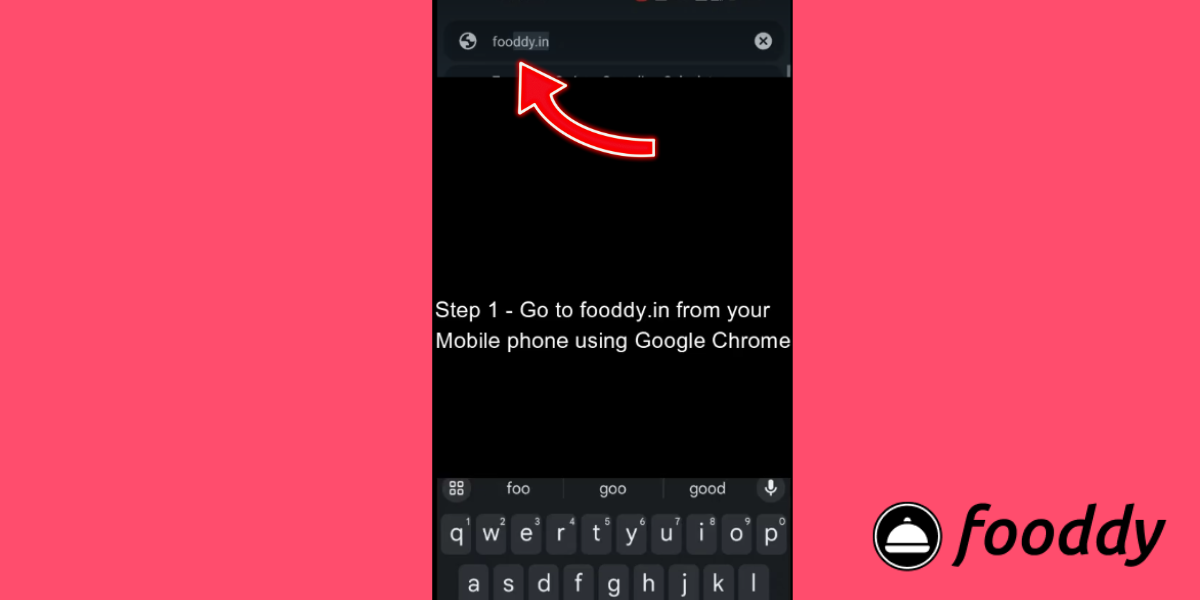
1: Open the Chrome browser on your mobile device and visit fooddy.in
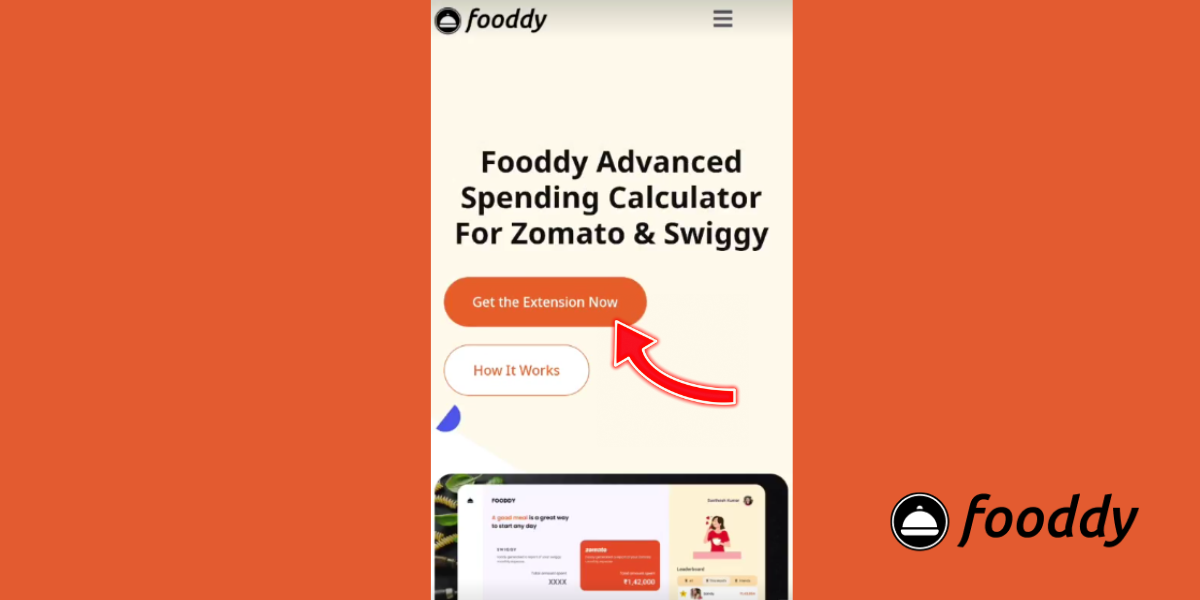
2: On the Fooddy website, click “Get Extension Now” to start the setup
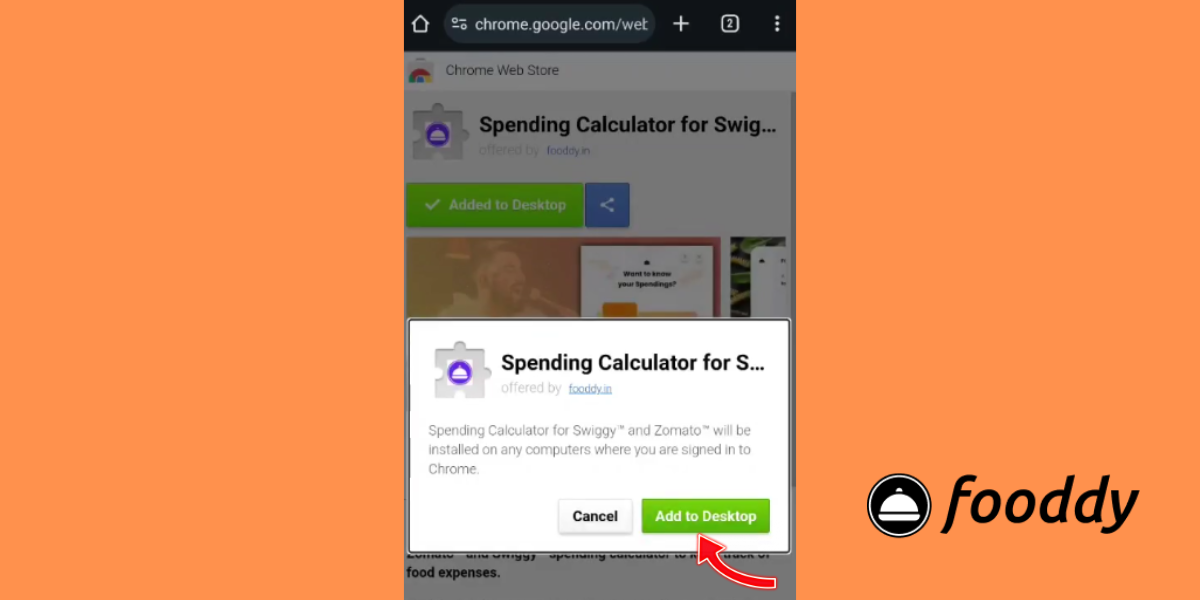
3: You’ll be redirected to the Google Chrome Web Store, where you can review the extension page and continue.
4: Find and click the “Add to Desktop” button to install the extension in Chrome
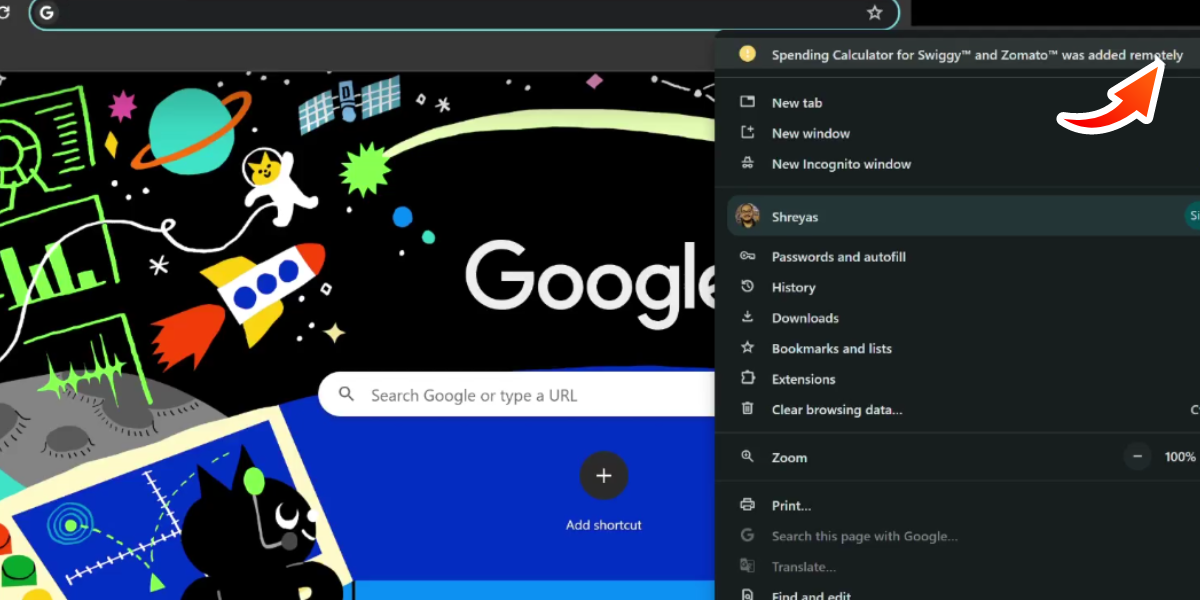
5: Next, switch to your desktop/laptop, turn it on, and open Google Chrome.
6: In the top-right corner of Chrome, click the three vertical dots to open the settings menu.
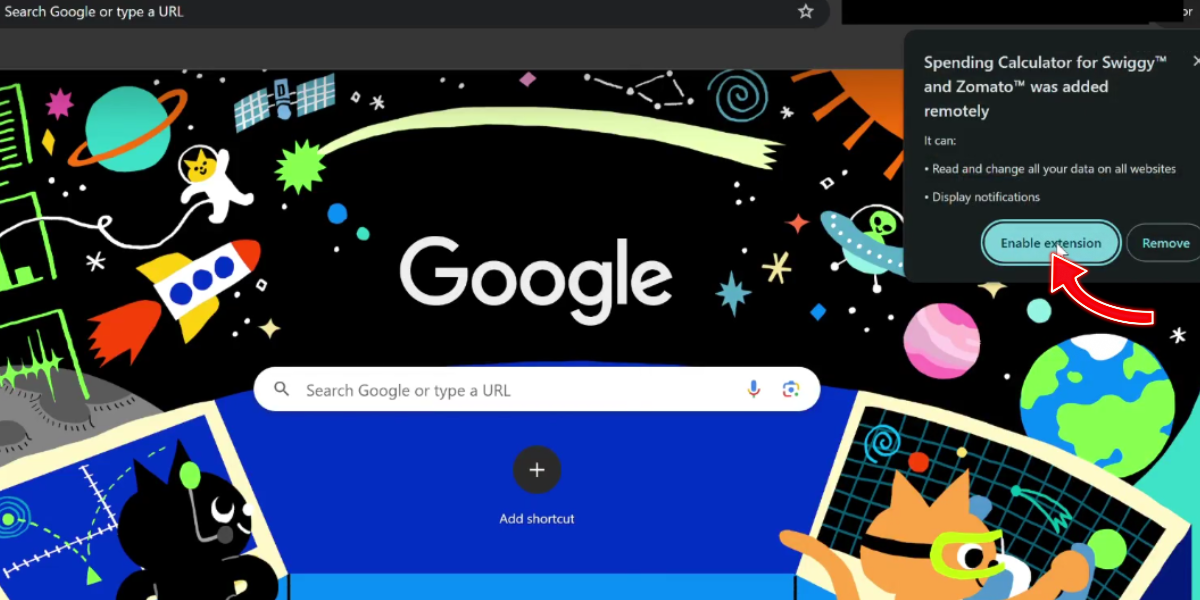
7: Go to Extensions, find Fooddy, and ensure the toggle/slider is turned ON
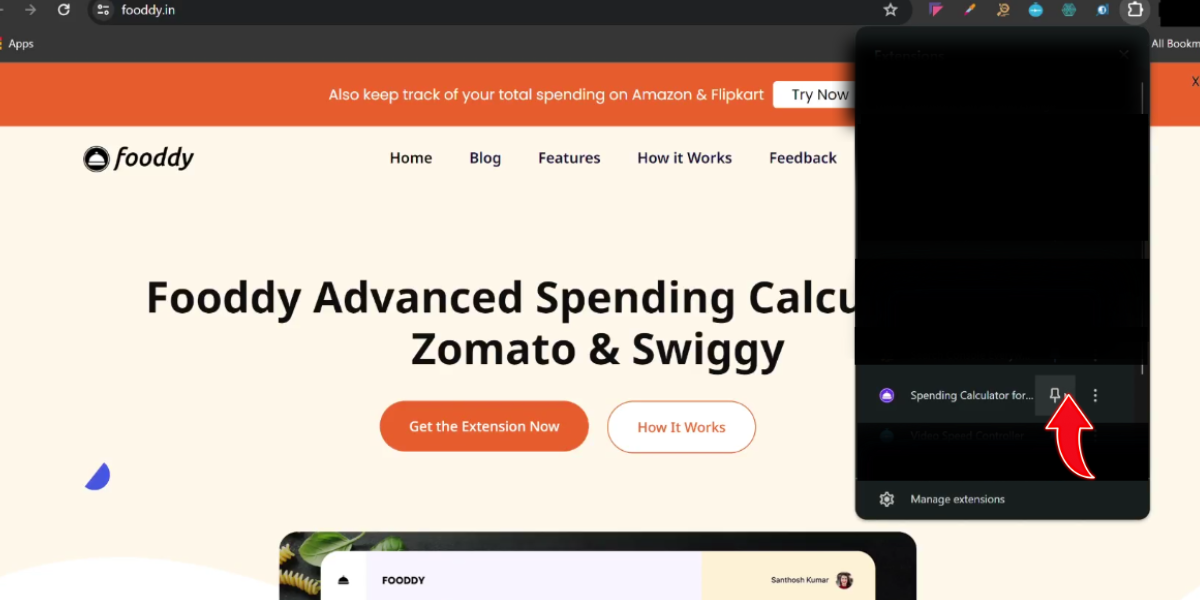
8: Open the Zomato app, then use the Fooddy extension icon to view how much was spent on recent orders (tap the icon to see the summary).
How to Check Zomato Total Spending on Mobile
Checking your Zomato total spending on mobile follows a simple process. While the exact interface may change, the approach remains consistent.
Steps to Check Zomato Spending on Mobile
- Log in to your Zomato account on your mobile phone.
- Open your profile or account section and go to Orders (order history).
- Scroll down to load older orders so totals are more accurate.
- Use a Zomato spending calculator or spending summary method to calculate totals.
- Review monthly, yearly, or overall spending patterns.
Accuracy Note – Totals vary if old orders don’t load, refunds/cancellations, etc
This process works across devices and is the foundation for calculating both short-term and long-term spending.
Zomato Spending Calculator Android: How It Works
Android users often search specifically for Zomato spending calculator Android because most Zomato usage happens through the Android app.
On Android:
- Open the Zomato app
- Go to Profile → Orders
- Scroll to load older orders
- Use a spending calculator approach to estimate totals
A spending calculator for Zomato in mobile app on Android focuses on visibility—making sure all past orders are included before totals are reviewed
Zomato Spending Calculator for iPhone (iOS)
iPhone users follow a similar flow, which is why Zomato spending calculator for iPhone is another common search.
On iOS:
- Open the Zomato app
- Tap Profile → Orders
- Load older order history
- Review totals using a calculator or summary tool
Whether on Android or iPhone, the key step is ensuring older orders are visible so the Zomato lifetime spending estimate is as accurate as possible.
Zomato Lifetime Spending: What You Should Know
Zomato lifetime spending refers to the total amount you’ve spent since you started using Zomato. Many users assume this number is shown directly inside the app, but that isn’t always the case.
A Zomato spending calculator helps estimate lifetime spending by:
- Adding up all completed orders
- Ignoring cancelled or refunded orders where possible
- Presenting totals in a single view
This makes it easier to understand long-term habits rather than just recent activity.
Zomato Spending Calculator Extension: Desktop Support
Some users prefer desktop-based analysis, especially when reviewing long-term spending. A Zomato spending calculator extension helps bridge this gap by offering a clearer, larger-screen view of order data.
This is where tools like the Fooddy extension (also searched as foody extension) are useful. Extensions can help load and analyse order history more comfortably, while still complementing mobile tracking.
Note – If Chrome doesn’t support extensions on your mobile, use Kiwi Browser on Android (steps below)
Tracking Your Zomato Total Spending on Mobile Using Our Extension
Zomato does not offer an official spending calculator inside the app. However, using our extension, you can still calculate Zomato total spending on mobile by viewing your order history through a browser that supports extensions. Follow the steps below to get started.
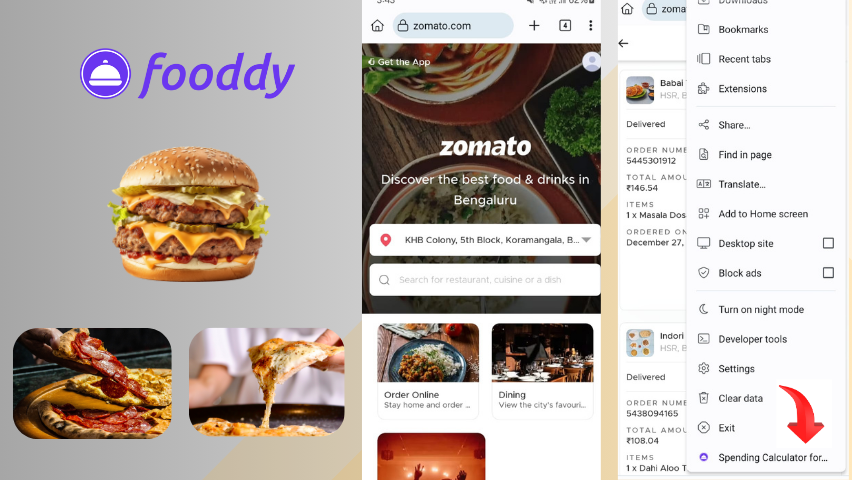
Step-by-Step Guide
- Step 1: Install the Kiwi Browser (Android)
Open the Google Play Store on your Android phone, search for Kiwi Browser, and install it. - Step 2: Open Kiwi Browser
Launch Kiwi Browser after installation, then tap the menu icon (top-right) to open settings. - Step 3: Open Extensions
In the menu, tap Extensions (puzzle icon). This is where you manage and install browser add-ons. - Step 4: Search for the extension
Tap “+ (from store)” to open the Chrome Web Store, then search for the Fooddy extension (or use your direct link). - Step 5: Add the extension
Open the extension page and tap “Add to Chrome”. Wait for the installation to complete. - Step 6: Use the extension with Zomato
In Kiwi Browser, open Zomato and go to the Orders section. Open the Zomato menu (three lines). You should now see the extension option. - Step 7: Activate the extension
Tap the extension icon. Once enabled, it starts monitoring your Zomato orders and spending. - Step 8: View your spending report
Your spending insights can be viewed inside the Zomato flow (via Kiwi Browser) or by opening Kiwi Browser separately and checking the extension report.
Key Insights Provided by the Extension
- Total Spending: View your overall Zomato expenses in one place.
- Spending by Date/Month: Track trends across weeks or months.
- Restaurant Breakdown: See which restaurants you order from most.
- Order Details: Access order-level details and receipts.
Spending Calculator for Swiggy and Zomato on Phone
Many users don’t rely on a single app. If you switch between platforms, a spending calculator for Swiggy and Zomato on phone helps compare habits across both services.
Tracking both apps together allows you to:
- Compare Zomato vs Swiggy spending
- Identify which app drives higher costs
- Adjust ordering habits more effectively
This comparison approach is especially helpful for users managing food budgets across multiple platforms.
How Fooddy Helps Track Zomato Spending
Fooddy is designed to make food delivery budgeting simpler. Instead of manually tracking orders, Fooddy.in helps users understand food spending patterns across platforms.
Why Use Fooddy?
- Simplifies food delivery budget tracking
- Helps identify spending trends over time
- Reduces the need for manual calculations
- Works alongside mobile and desktop usage
For users who order frequently, Fooddy offers a clearer view of habits without disrupting convenience.
Ways to Reduce Zomato Spending Using a Calculator
Once your spending is visible, controlling it becomes easier. A Zomato spending calculator on mobile isn’t just for tracking—it’s a decision tool.
Practical Tips
- Set a weekly or monthly food delivery budget
- Watch late-night and weekend spending spikes
- Limit impulse orders by reviewing totals regularly
- Compare monthly spend to identify improvement areas
Small habit changes often lead to noticeable savings.
Conclusion
A Zomato spending calculator on mobile makes food delivery spending transparent. By reviewing Zomato total spending, estimating Zomato lifetime spending, and understanding ordering patterns, users can make smarter budget decisions without giving up convenience.
Whether you’re checking spending on Android, iPhone, or using a Zomato spending calculator extension, tools like Fooddy and Fooddy extension make it easier to track, compare, and manage food delivery expenses.
FAQs
Yes. While Zomato does not show total or lifetime spending directly inside the app, you can estimate your Zomato total spending on mobile using a browser-based extension that analyses your order history.
No. Zomato currently does not offer an official spending calculator or lifetime spending summary within its mobile app or website.
On Android, browsers like Kiwi Browser support Chrome extensions on mobile, making it possible to use a Zomato spending calculator extension to track spending
The extension calculates spending based on your visible order history. Accuracy depends on loading older orders fully and excluding cancelled or refunded orders where applicable.
Yes. By analysing your complete order history, the extension helps estimate Zomato lifetime spending and provides insights such as monthly trends and frequent restaurants.
What Our Users Say About Fooddy
“I’ve been using the Zomato Spending Calculator for a few weeks now, and it’s been a game-changer for me. I used to overspend on food delivery without even realizing it, but now, with the app’s real-time tracking and spending limits feature, I feel more in control of my budget. It’s helped me save money and make smarter choices about where I order from.”
Abhishek
“As someone who loves ordering food online, I was excited to try out the Zomato Spending Calculator extension. I’ve found the comprehensive spending analysis feature particularly helpful—it’s given me valuable insights into my spending habits and helped me identify areas where I can cut back. Plus, the user-friendly interface makes it easy to navigate and use.”
Shreya