Non-alcoholic beer has quickly shifted from a niche option to a mainstream choice. Whether you’re cutting back on alcohol, living sober, being the designated driver, or just curious about the taste of beer without the buzz, it’s a great time to explore alcohol-free varieties—especially since the range and quality have improved a lot, making them a refreshing alternative. With Swiggy Instamart, you can find and order these options without stepping out—browse brands, compare flavors, read labels, and get delivery like any other grocery item. This guide explains how to order non-alcoholic beer on Swiggy Instamart and helps you get the best out of every delivery.
- Check availability near you
- Place your order quickly and smoothly
- Understand what non-alcoholic beer is and why people choose it
- Get clear answers to common Instamart and alcohol-delivery FAQs.
How to Order Non Alcoholic Beer from Swiggy Instamart
Ordering non-alcoholic beer from Swiggy Instamart is straightforward and similar to purchasing other grocery or beverage items online. The important part is knowing exactly where to find these products on the platform and how to use filters to narrow down your choices efficiently.
To help you navigate this process easily on your phone, here is a clear, step-by-step guide divided into simple headings. This will ensure you can quickly find the non-alcoholic beers you want, check availability nearby, and place your order with confidence for speedy delivery right to your doorstep.
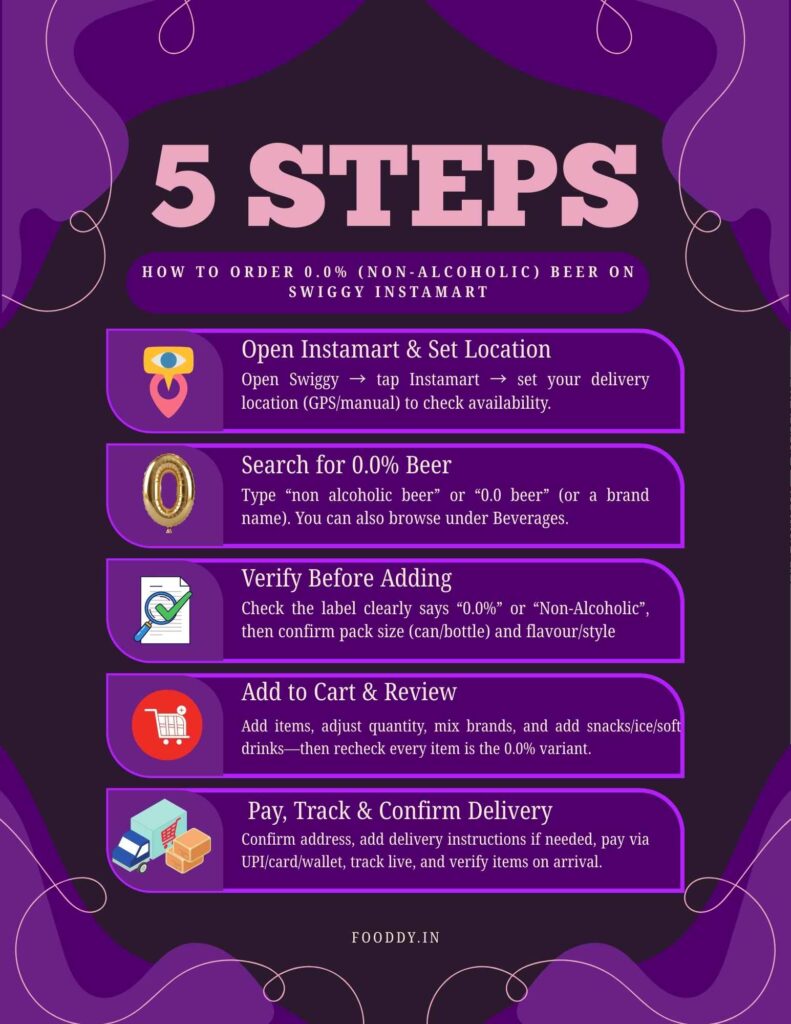
Steps to follow:
- Open the Swiggy app and tap “Instamart” from the home screen.
- Set your delivery location correctly (either via GPS or manually). Availability depends on your area, so this decides what you’ll see.
- Search for the right term: type “non alcoholic beer” or “0.0 beer” (you can also try a brand name). You can also browse under Beverages if needed.
- Check product details before adding: confirm it clearly says “0.0%” or “Non-Alcoholic”, then check pack size (can/bottle) and flavour/style.
- Add items to the cart and adjust quantity. You can mix brands for variety, and add snacks, ice, or soft drinks in the same order.
- Review your cart carefully to confirm every selected beer is the non-alcoholic/0.0% variant you want.
- Choose delivery and payment: confirm address, add simple rider instructions if needed, then pay via UPI/card/wallet, etc.
- Please place the order and track it live. Once it arrives, quickly verify the items match your selection, then chill and enjoy (or store for later).
Related – Liquor Home Delivery Apps in Pune
What Is Non-Alcoholic Beer and Why Order It Online?
Modern non-alcoholic beer is crafted to taste and feel like real beer—full-bodied flavor, aroma, and mouthfeel—just without the intoxication. It’s a solid option if you want the beer experience for health, lifestyle, or personal reasons while avoiding alcohol.
Before ordering on Swiggy Instamart, it helps to know what you’re choosing. Online ordering makes it easy to explore more brands and flavors, compare options, check ingredients/nutrition details, and get doorstep delivery—whether you’re trying it for the first time or restocking.
What counts as “non-alcoholic” beer?
- 0.0% ABV: completely alcohol-free; safest for people strictly avoiding alcohol
- Up to 0.5% ABV: very low alcohol; often labelled “non-alcoholic/alcohol-free” under local rules
- In India (FSSAI): “non-alcoholic counterpart of alcoholic beverage” means ≤ 0.5% alcohol by volume, and it must meet the same requirements as the alcoholic version except for ethyl alcohol content
- Quick choice tip: if you must avoid alcohol for medical, religious, or personal reasons, pick 0.0% ABV labels
Benefits
Non-alcoholic beer is popular because it gives you the beer taste without the alcohol effect, and Swiggy Instamart makes it easy to order anytime.
Key benefits:
- Enjoy the same beer-like taste without getting tipsy
- Helps you cut down on alcohol while staying on track with health goals
- Great for parties so everyone has an option
- Safe for weeknights—wake up fresh the next day
- Easy to stock up on Instamart: compare brands, check availability, and get quick delivery with snacks and extras
How to Order Non Alcoholic Beer from Swiggy Instamart Online
Swiggy Instamart is fundamentally an online service, though people sometimes specify “order online” to differentiate it from physically visiting a store. Here’s a quick overview focused on the online experience:
Here’s how the online experience works:
- Use the Swiggy app to access Instamart
- Log in / sign up and keep your mobile number active for OTP + updates
- Save multiple addresses (home/office/friend’s place) since stock can change by location
- Search, add to cart, and pay digitally in the app
- Track delivery live on the map until it arrives
- No calls, price negotiation, or manual delivery setup—everything is handled in-app
This streamlined online approach ensures a hassle-free shopping experience for non-alcoholic beer and other groceries, saving you time and effort.
Tips to Make the Most of Your Instamart Non-Alcoholic Beer Order
To elevate your experience from “good” to “great,” keep these practical tips in mind:
Chill in advance
Non-alcoholic beer tastes best when properly chilled. If you’re planning a party or a cozy evening, place your order ahead of time to allow enough time for the cans or bottles to cool thoroughly in your fridge. This ensures every sip is refreshingly cold.
Combine with snacks and sides
Instamart offers a variety of snacks, dips, and party essentials to complement your non-alcoholic beer, so create a full experience by adding:
- Nachos, chips, and popcorn for classic crunch.
- Samosas, frozen snacks, or finger foods if they’re available in your area, ideal for savory bites.
- Dips such as salsa, cheese, hummus, or mayo-based sauces to add flavor and variety to your snacks.
Try different styles and brands
- If you’re new to non-alcoholic beer, experiment by ordering small quantities of different brands and styles.
- Sample lagers, wheat-style beers, and flavored variants to find what suits your taste best.
- Keep track of your favorites so you can reorder your preferred choices for future orders, tailoring your selection to what you enjoy most.
These tips will help you create a more enjoyable and personalized non-alcoholic beer experience straight from Instamart’s convenience.
Check for offers and deals
- Instamart frequently features promotions to help you save money, such as:
- Bundle discounts when you buy multiple units of the same or different non-alcoholic beers.
- Platform-wide offers like free delivery on orders above a certain amount.
- Wallet or card-specific cashback deals that further reduce your bill.
- Always remember to apply any relevant coupon codes or promotional offers during checkout to maximize your savings and get the best value for your order.
Also Read – Liquor Home Delivery Apps in Delhi
Read reviews (if available)
Some products on Instamart may include user ratings and short reviews, which can be very helpful when making a choice. These reviews typically cover:
- Taste profiles like sweet, bitter, or well-balanced flavors.
- Mouthfeel descriptions such as light or full-bodied texture.
- Overall satisfaction scores and comments, giving a quick sense of customer experience.
Store properly
Once your order arrives, store your non-alcoholic beers correctly to maintain freshness and flavor:
- Keep them in a cool, dry place away from direct sunlight to avoid spoilage.
- Refrigerate a few bottles or cans in advance if you plan to drink them regularly or serve them chilled.
- Always check expiry dates and try to consume the beers within the recommended period for the best taste and safety.
Plan for guests with different preferences
If you’re hosting a gathering, consider all your guests’ tastes and needs by:
- Ordering non-alcoholic beer specifically for teetotalers, designated drivers, or those avoiding alcohol.
- Keeping a variety of soft drinks, juices, and water as backup options.
- Clearly labeling non-alcoholic bottles or cans so guests can easily identify them, preventing any confusion during the event.
These additional tips will help you enjoy and share your Instamart non-alcoholic beer order seamlessly, whether for yourself or a group.
Must See – Liquor Delivery Apps in Bangalore
Conclusion
Non-alcoholic beer is ideal if you enjoy the taste and ritual of beer but want to avoid or reduce alcohol. With Swiggy Instamart, you can order it as easily as snacks—straight from your phone—so you can explore different options without visiting multiple stores or standing in queues.
Once you know what to look for on labels and how Instamart works in your area, you can confidently:
- Try 0.0% and low-alcohol options for different tastes
- Stock up for parties, family events, or quiet nights in
- Choose drinks that match your health and lifestyle goals
- Make gatherings more inclusive with something for everyone
Use this guide as your quick roadmap, search “non alcoholic beer” on Instamart, pick the right products, time your order well, and enjoy an easy at-home experience
FAQs